

Readme

LiveFaceSwap AI Reference Image Prep
A reliable AI face-swap workflow starts with a reference portrait that is upright, square, and consistently sized. LiveFaceSwap Reference Image Prep turns an authorized JPG, PNG, or WebP portrait into a predictable RGB PNG by normalizing EXIF orientation, cropping around an adjustable focal point, and resizing it to 512, 768, or 1024 pixels.
This is a deterministic preprocessing utility, not a face-swap model. It does not detect faces, generate media, train an identity model, or transform identity; it prepares a reference image for an authorized workflow such as the LiveFaceSwap AI real-time face swap tool.
Open the Streamlit app · Run on Replicate · Install from PyPI · Report an issue
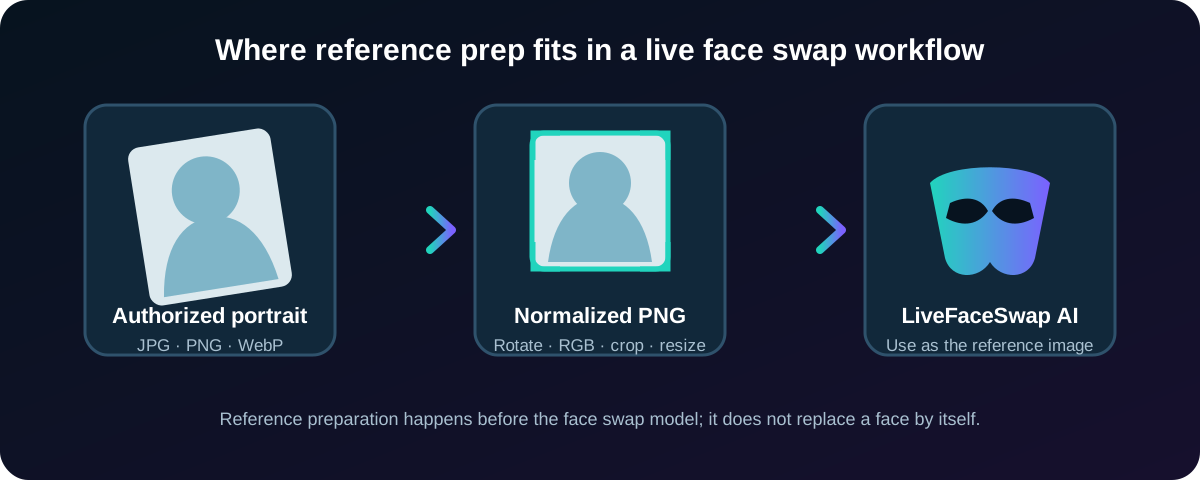
Where it fits in a face-swap workflow
- Choose a clear portrait that you own or have permission to use.
- Prepare it with this utility to get a square, orientation-corrected RGB PNG.
- Use the prepared PNG as the reference image in your authorized LiveFaceSwap AI workflow.
Preparing the file first removes avoidable differences in rotation, color mode, framing, and dimensions before a face-swap model receives it. The utility does not claim to improve model quality, identity similarity, frame rate, or output accuracy.
Real, reproducible example
The repository includes a generated portrait fixture, so the workflow can be tested without using a real person’s image. The output shown below was produced by this package with size=1024, focus_x=0.5, and focus_y=0.42.
| Authorized synthetic input | Prepared reference output |
|---|---|
 |
 |
Reproduce it locally:
livefaceswap-reference-prep \
  examples/synthetic-portrait.png \
  prepared.png \
  --size 1024 \
  --focus-x 0.5 \
  --focus-y 0.42
Expected output: a 1024 × 1024 RGB PNG.
What the utility does
- EXIF orientation: applies the camera rotation stored in image metadata before cropping.
- RGB conversion: converts palette, grayscale, RGBA, and other Pillow-readable modes to RGB.
- Adjustable square crop: takes the largest possible square and moves it toward the configured focal point.
- Consistent dimensions: resizes the result to 512, 768, or 1024 pixels with Lanczos resampling.
- Clean PNG export: writes a new PNG without carrying source EXIF or ancillary metadata into the output.
It does not score portrait quality or automatically locate a face. Use focus_x and focus_y when the subject is not centered.
Inputs and output
| Input | Accepted values | Purpose |
|---|---|---|
image |
JPG, PNG, or WebP | Source portrait |
size |
512, 768, or 1024 |
Square output width and height |
focus_x |
0.0 to 1.0 |
Horizontal crop focus: left to right |
focus_y |
0.0 to 1.0 |
Vertical crop focus: top to bottom |
The output is one square RGB PNG. Use a separate output path when you want to retain the source file. For a centered portrait, start with focus_x=0.5 and focus_y=0.5; a value such as focus_y=0.42 moves the crop slightly upward.
Install from PyPI
python -m pip install livefaceswap-reference-prep
Prepare a portrait with the CLI:
livefaceswap-reference-prep portrait.jpg prepared.png \
  --size 1024 \
  --focus-x 0.5 \
  --focus-y 0.42
Use the Python API:
from pathlib import Path

from livefaceswap_reference_prep import prepare_reference_image

prepare_reference_image(
    Path("portrait.jpg"),
    Path("prepared.png"),
    size=1024,
    focus_x=0.5,
    focus_y=0.42,
)
Cog and Replicate
Run the Cog predictor locally:
cog predict \
  -i image=@portrait.jpg \
  -i size=1024 \
  -i focus_x=0.5 \
  -i focus_y=0.42
The same four inputs are exposed by the LiveFaceSwap Reference Prep demo on Replicate. The predictor returns a prepared PNG; it does not return a face-swapped image.
Streamlit browser app
Open the LiveFaceSwap reference image Streamlit app, or run it locally. Anonymous access depends on the current Streamlit deployment sharing setting.
git clone https://github.com/LiveFaceSwapAI/livefaceswap-reference-prep.git
cd livefaceswap-reference-prep
python -m pip install -r requirements.txt
streamlit run app.py
The app accepts JPG, PNG, and WebP files up to 20 MB. It lets you adjust the crop focus, preview the result, and download the prepared PNG.
Container usage
Run the public Docker Hub image:
docker run --rm \
  -v "$PWD/input:/input:ro" \
  -v "$PWD/output:/output" \
  cabbagehao/livefaceswap-reference-prep:latest \
  /input/portrait.jpg /output/prepared.png --size 1024
Other verified surfaces
- LiveFaceSwap Reference Prep on ModelScope
- LiveFaceSwap Reference Prep on Hugging Face Spaces
- LiveFaceSwap Reference Prep on Docker Hub
FAQ
Does this tool perform a face swap?
No. It only prepares a reference image. Face swapping or other identity transformation happens in a separate authorized workflow.
Why use a square PNG?
A fixed square size and RGB color mode remove orientation, aspect-ratio, and image-mode differences from later processing steps. This utility does not claim that one output size is best for every model.
Does it upload or store the source portrait?
The core Python utility reads the source and writes the prepared result in the environment where it is run. Storage and retention therefore depend on the platform or machine running it.
Which output size should I choose?
Use 1024 for the largest available reference. Choose 512 or 768 when the next workflow requires a smaller input.
Project scope and responsible use
This repository contains a deterministic portrait preprocessor, CLI, Streamlit wrapper, Cog predictor, tests, and public packaging workflows. It does not contain the LiveFaceSwap AI production application or a face-swap model.
Only process portraits you own or have permission to use. Do not use reference images for impersonation, fraud, harassment, or deceptive activity.
Learn more at the LiveFaceSwap AI official website.
Recent updates
0.1.1 - 2026-08-24
- Added a clear face-swap workflow explanation and repository-hosted visual assets.
- Added a reproducible synthetic input/output example.
- Clarified PyPI, CLI, Cog, Replicate, Streamlit, and container usage without expanding the tool’s capability claims.
See the LiveFaceSwap Reference Prep changelog for release details.
Support and security
Use GitHub Issues for reproducible public bugs and feature requests. See the support guide for private product support and the security policy for confidential vulnerability reports.
License
The Python package and repository source are available under the MIT License.