typetext
Model
ID
0za0krys0srm80cn2ktabjavcr
Status
Succeeded
Source
Web
Hardware
H100
Total duration
Created
Webhook
–
Input
- prompt
- windu sitting in a chair
- image
- mask
- aspect_ratio
- 21:9default1:1typeenumvalue typestringoptions1:1, 16:9, 21:9, 3:2, 2:3, 4:5, 5:4, 3:4, 4:3, 9:16, 9:21, custom
- prompt_strength
- 0.8default0.8typenumeric-rangevalue typenumbermaximum1
- model
- devdefaultdevtypeenumvalue typestringoptionsdev, schnell
- num_outputs
- 1default1typenumeric-rangevalue typeintegerminimum1maximum4
- num_inference_steps
- 28default28typenumeric-rangevalue typeintegerminimum1maximum50
- guidance_scale
- 3default3typenumeric-rangevalue typenumbermaximum10
- output_format
- jpgdefaultwebptypeenumvalue typestringoptionswebp, jpg, png
- output_quality
- 80default80typenumeric-rangevalue typeintegermaximum100
- go_fast
- falsetypeboolean
- megapixels
- 1default1typeenumvalue typestringoptions1, 0.25
- lora_scale
- 1default1typenumeric-rangevalue typenumberminimum-1maximum3
- extra_lora_scale
- 1default1typenumeric-rangevalue typenumberminimum-1maximum3
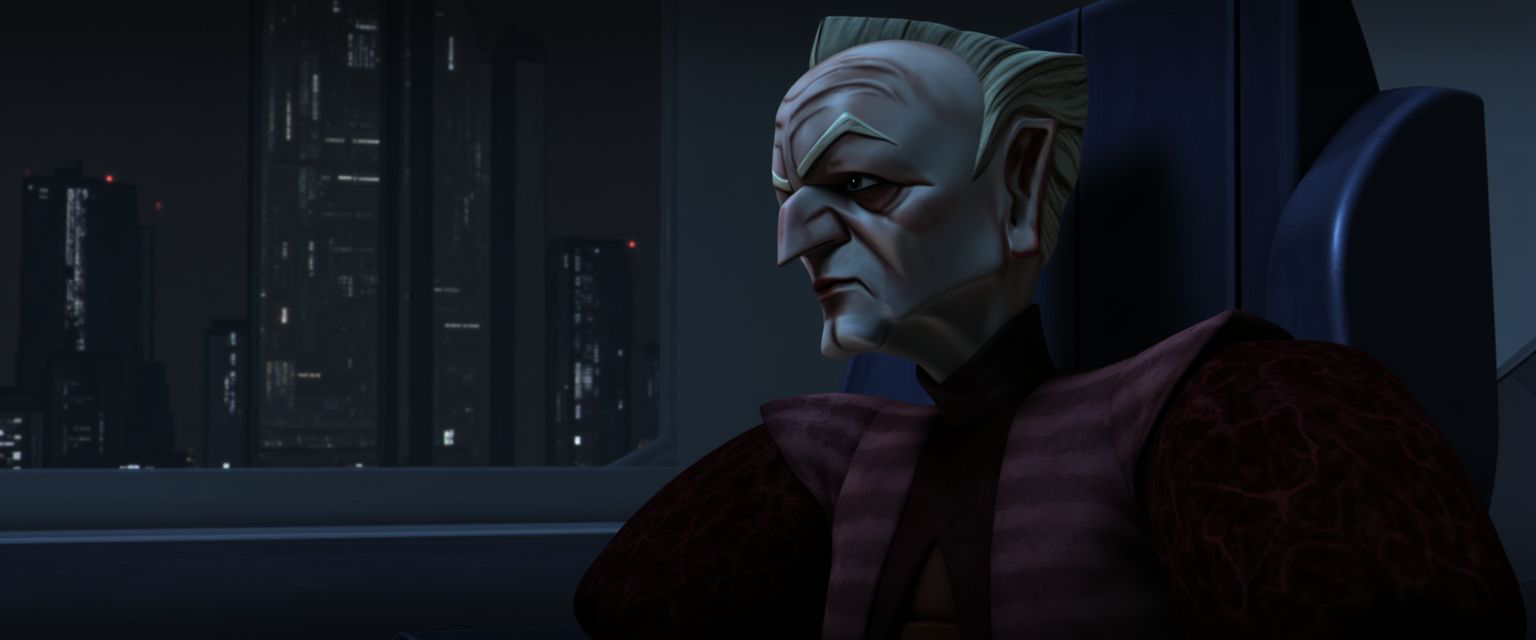

{
  "aspect_ratio": "21:9",
  "extra_lora_scale": 1,
  "go_fast": false,
  "guidance_scale": 3,
  "image": "https://replicate.delivery/pbxt/MW3DzDSPvSGGCirpj7SByIOUEHcXJBBLSGvDe1PuUrpaPgbO/full.png",
  "lora_scale": 1,
  "mask": "https://replicate.delivery/pbxt/MW3Dyqdtn6JdKvOzr9qFJLdIzmivKKu25vFrWc1cXyJqL2Ru/test.png",
  "megapixels": "1",
  "model": "dev",
  "num_inference_steps": 28,
  "num_outputs": 1,
  "output_format": "jpg",
  "output_quality": 80,
  "prompt": "windu sitting in a chair ",
  "prompt_strength": 0.8
}
Install Replicate’s Node.js client library:
npm install replicate
Set the
REPLICATE_API_TOKEN environment variable:export REPLICATE_API_TOKEN=r8_dDg**********************************
This is your API token. Keep it to yourself.
Import and set up the client:
import Replicate from "replicate";
import fs from "node:fs";

const replicate = new Replicate({
  auth: process.env.REPLICATE_API_TOKEN,
});
Run swk23/windu using Replicate’s API. Check out the model's schema for an overview of inputs and outputs.
const output = await replicate.run(
  "swk23/windu:65f4bf32a31353e76b48659846fba61ecb49445c20a0d365f9a83fd151193847",
  {
    input: {
      aspect_ratio: "21:9",
      extra_lora_scale: 1,
      go_fast: false,
      guidance_scale: 3,
      image: "https://replicate.delivery/pbxt/MW3DzDSPvSGGCirpj7SByIOUEHcXJBBLSGvDe1PuUrpaPgbO/full.png",
      lora_scale: 1,
      mask: "https://replicate.delivery/pbxt/MW3Dyqdtn6JdKvOzr9qFJLdIzmivKKu25vFrWc1cXyJqL2Ru/test.png",
      megapixels: "1",
      model: "dev",
      num_inference_steps: 28,
      num_outputs: 1,
      output_format: "jpg",
      output_quality: 80,
      prompt: "windu sitting in a chair ",
      prompt_strength: 0.8
    }
  }
);

// To access the file URL:
console.log(output[0].url()); //=> "http://example.com"

// To write the file to disk:
fs.writeFile("my-image.png", output[0]);
To learn more, take a look at the guide on getting started with Node.js.
Install Replicate’s Python client library:
pip install replicate
Set the
REPLICATE_API_TOKEN environment variable:export REPLICATE_API_TOKEN=r8_dDg**********************************
This is your API token. Keep it to yourself.
Import the client:
import replicate
Run swk23/windu using Replicate’s API. Check out the model's schema for an overview of inputs and outputs.
output = replicate.run(
    "swk23/windu:65f4bf32a31353e76b48659846fba61ecb49445c20a0d365f9a83fd151193847",
    input={
        "aspect_ratio": "21:9",
        "extra_lora_scale": 1,
        "go_fast": False,
        "guidance_scale": 3,
        "image": "https://replicate.delivery/pbxt/MW3DzDSPvSGGCirpj7SByIOUEHcXJBBLSGvDe1PuUrpaPgbO/full.png",
        "lora_scale": 1,
        "mask": "https://replicate.delivery/pbxt/MW3Dyqdtn6JdKvOzr9qFJLdIzmivKKu25vFrWc1cXyJqL2Ru/test.png",
        "megapixels": "1",
        "model": "dev",
        "num_inference_steps": 28,
        "num_outputs": 1,
        "output_format": "jpg",
        "output_quality": 80,
        "prompt": "windu sitting in a chair ",
        "prompt_strength": 0.8
    }
)

# To access the file URL:
print(output[0].url())
#=> "http://example.com"

# To write the file to disk:
with open("my-image.png", "wb") as file:
    file.write(output[0].read())
To learn more, take a look at the guide on getting started with Python.
Set the
REPLICATE_API_TOKEN environment variable:export REPLICATE_API_TOKEN=r8_dDg**********************************
This is your API token. Keep it to yourself.
Run swk23/windu using Replicate’s API. Check out the model's schema for an overview of inputs and outputs.
curl -s -X POST \
  -H "Authorization: Bearer $REPLICATE_API_TOKEN" \
  -H "Content-Type: application/json" \
  -H "Prefer: wait" \
  -d $'{
    "version": "swk23/windu:65f4bf32a31353e76b48659846fba61ecb49445c20a0d365f9a83fd151193847",
    "input": {
      "aspect_ratio": "21:9",
      "extra_lora_scale": 1,
      "go_fast": false,
      "guidance_scale": 3,
      "image": "https://replicate.delivery/pbxt/MW3DzDSPvSGGCirpj7SByIOUEHcXJBBLSGvDe1PuUrpaPgbO/full.png",
      "lora_scale": 1,
      "mask": "https://replicate.delivery/pbxt/MW3Dyqdtn6JdKvOzr9qFJLdIzmivKKu25vFrWc1cXyJqL2Ru/test.png",
      "megapixels": "1",
      "model": "dev",
      "num_inference_steps": 28,
      "num_outputs": 1,
      "output_format": "jpg",
      "output_quality": 80,
      "prompt": "windu sitting in a chair ",
      "prompt_strength": 0.8
    }
  }' \
  https://api.replicate.com/v1/predictions
To learn more, take a look at Replicate’s HTTP API reference docs.
Output
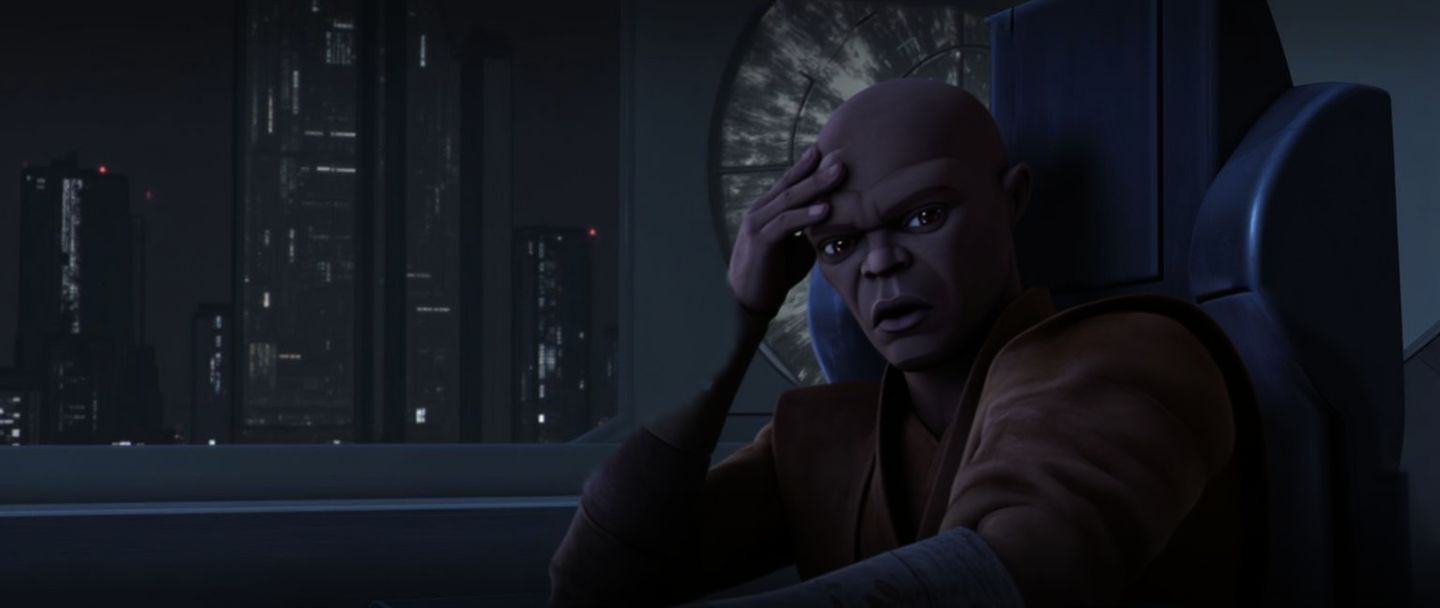
{
  "id": "0za0krys0srm80cn2ktabjavcr",
  "model": "swk23/windu",
  "version": "65f4bf32a31353e76b48659846fba61ecb49445c20a0d365f9a83fd151193847",
  "input": {
    "aspect_ratio": "21:9",
    "extra_lora_scale": 1,
    "go_fast": false,
    "guidance_scale": 3,
    "image": "https://replicate.delivery/pbxt/MW3DzDSPvSGGCirpj7SByIOUEHcXJBBLSGvDe1PuUrpaPgbO/full.png",
    "lora_scale": 1,
    "mask": "https://replicate.delivery/pbxt/MW3Dyqdtn6JdKvOzr9qFJLdIzmivKKu25vFrWc1cXyJqL2Ru/test.png",
    "megapixels": "1",
    "model": "dev",
    "num_inference_steps": 28,
    "num_outputs": 1,
    "output_format": "jpg",
    "output_quality": 80,
    "prompt": "windu sitting in a chair ",
    "prompt_strength": 0.8
  },
  "logs": "free=28122040393728\nDownloading weights\n2025-02-17T17:29:09Z | INFO  | [ Initiating ] chunk_size=150M dest=/tmp/tmpxb71_ofw/weights url=https://replicate.delivery/xezq/elmrBIPtlCyRYaRsePplNWBGJOrcq6QlPv2pAFje42I50xynA/trained_model.tar\n2025-02-17T17:29:11Z | INFO  | [ Complete ] dest=/tmp/tmpxb71_ofw/weights size=\"172 MB\" total_elapsed=1.324s url=https://replicate.delivery/xezq/elmrBIPtlCyRYaRsePplNWBGJOrcq6QlPv2pAFje42I50xynA/trained_model.tar\nDownloaded weights in 1.35s\nLoaded LoRAs in 1.90s\nUsing seed: 5644\nPrompt: windu sitting in a chair\nInput image size: 1536x640\n[!] Resizing input image from 1536x640 to 1440x608\n[!] inpaint mode\n  0%|          | 0/23 [00:00<?, ?it/s]\n  4%|▍         | 1/23 [00:00<00:19,  1.10it/s]\n  9%|▊         | 2/23 [00:01<00:10,  2.01it/s]\n 13%|█▎        | 3/23 [00:01<00:07,  2.71it/s]\n 17%|█▋        | 4/23 [00:01<00:05,  3.25it/s]\n 22%|██▏       | 5/23 [00:01<00:04,  3.66it/s]\n 26%|██▌       | 6/23 [00:01<00:04,  3.95it/s]\n 30%|███       | 7/23 [00:02<00:03,  4.17it/s]\n 35%|███▍      | 8/23 [00:02<00:03,  4.32it/s]\n 39%|███▉      | 9/23 [00:02<00:03,  4.43it/s]\n 43%|████▎     | 10/23 [00:02<00:02,  4.51it/s]\n 48%|████▊     | 11/23 [00:03<00:02,  4.56it/s]\n 52%|█████▏    | 12/23 [00:03<00:02,  4.60it/s]\n 57%|█████▋    | 13/23 [00:03<00:02,  4.62it/s]\n 61%|██████    | 14/23 [00:03<00:01,  4.64it/s]\n 65%|██████▌   | 15/23 [00:03<00:01,  4.66it/s]\n 70%|██████▉   | 16/23 [00:04<00:01,  4.67it/s]\n 74%|███████▍  | 17/23 [00:04<00:01,  4.67it/s]\n 78%|███████▊  | 18/23 [00:04<00:01,  4.68it/s]\n 83%|████████▎ | 19/23 [00:04<00:00,  4.68it/s]\n 87%|████████▋ | 20/23 [00:04<00:00,  4.68it/s]\n 91%|█████████▏| 21/23 [00:05<00:00,  4.66it/s]\n 96%|█████████▌| 22/23 [00:05<00:00,  4.67it/s]\n100%|██████████| 23/23 [00:05<00:00,  4.95it/s]\n100%|██████████| 23/23 [00:05<00:00,  4.13it/s]\nTotal safe images: 1 out of 1",
  "output": [
    "https://replicate.delivery/xezq/NKc9yAJafxSf50I4hqASrl83NcSqxTRDmD1oeQI6TGRdfIBRB/out-0.jpg"
  ],
  "data_removed": false,
  "error": null,
  "source": "web",
  "status": "succeeded",
  "created_at": "2025-02-17T17:29:05.542Z",
  "started_at": "2025-02-17T17:29:09.417017Z",
  "completed_at": "2025-02-17T17:29:18.09819Z",
  "urls": {
    "cancel": "https://api.replicate.com/v1/predictions/0za0krys0srm80cn2ktabjavcr/cancel",
    "get": "https://api.replicate.com/v1/predictions/0za0krys0srm80cn2ktabjavcr",
    "stream": "https://stream.replicate.com/v1/files/bcwr-nsrnjhks7kabyl7wgzyz5zqimyefejh6pkiajvcluqx24h3ccaqa",
    "web": "https://replicate.com/p/0za0krys0srm80cn2ktabjavcr"
  },
  "metrics": {
    "predict_time": 8.681173174,
    "total_time": 12.55619
  }
}
Generated in
free=28122040393728
Downloading weights
2025-02-17T17:29:09Z | INFO | [ Initiating ] chunk_size=150M dest=/tmp/tmpxb71_ofw/weights url=https://replicate.delivery/xezq/elmrBIPtlCyRYaRsePplNWBGJOrcq6QlPv2pAFje42I50xynA/trained_model.tar
2025-02-17T17:29:11Z | INFO | [ Complete ] dest=/tmp/tmpxb71_ofw/weights size="172 MB" total_elapsed=1.324s url=https://replicate.delivery/xezq/elmrBIPtlCyRYaRsePplNWBGJOrcq6QlPv2pAFje42I50xynA/trained_model.tar
Downloaded weights in 1.35s
Loaded LoRAs in 1.90s
Using seed: 5644
Prompt: windu sitting in a chair
Input image size: 1536x640
[!] Resizing input image from 1536x640 to 1440x608
[!] inpaint mode
0%| | 0/23 [00:00<?, ?it/s]
4%|▍ | 1/23 [00:00<00:19, 1.10it/s]
9%|▊ | 2/23 [00:01<00:10, 2.01it/s]
13%|█▎ | 3/23 [00:01<00:07, 2.71it/s]
17%|█▋ | 4/23 [00:01<00:05, 3.25it/s]
22%|██▏ | 5/23 [00:01<00:04, 3.66it/s]
26%|██▌ | 6/23 [00:01<00:04, 3.95it/s]
30%|███ | 7/23 [00:02<00:03, 4.17it/s]
35%|███▍ | 8/23 [00:02<00:03, 4.32it/s]
39%|███▉ | 9/23 [00:02<00:03, 4.43it/s]
43%|████▎ | 10/23 [00:02<00:02, 4.51it/s]
48%|████▊ | 11/23 [00:03<00:02, 4.56it/s]
52%|█████▏ | 12/23 [00:03<00:02, 4.60it/s]
57%|█████▋ | 13/23 [00:03<00:02, 4.62it/s]
61%|██████ | 14/23 [00:03<00:01, 4.64it/s]
65%|██████▌ | 15/23 [00:03<00:01, 4.66it/s]
70%|██████▉ | 16/23 [00:04<00:01, 4.67it/s]
74%|███████▍ | 17/23 [00:04<00:01, 4.67it/s]
78%|███████▊ | 18/23 [00:04<00:01, 4.68it/s]
83%|████████▎ | 19/23 [00:04<00:00, 4.68it/s]
87%|████████▋ | 20/23 [00:04<00:00, 4.68it/s]
91%|█████████▏| 21/23 [00:05<00:00, 4.66it/s]
96%|█████████▌| 22/23 [00:05<00:00, 4.67it/s]
100%|██████████| 23/23 [00:05<00:00, 4.95it/s]
100%|██████████| 23/23 [00:05<00:00, 4.13it/s]
Total safe images: 1 out of 1