typetext
ID
k9zk8jzqqxrme0cqzzdrfahe64
Status
Succeeded
Source
Web
Hardware
H100
Total duration
Created
Webhook
–
Input
- prompt
- Replace “schnell” by “Kontext” and make the prune blue
- img_cond_path
- speed_mode
- Real TimedefaultJuiced 🔥 (default)typeenumvalue typestringoptionsLightly Juiced 🍊 (more consistent), Juiced 🔥 (default), Extra Juiced 🔥 (more speed), Blink of an eye 👁️, Real Time
- num_inference_steps
- 30default30typenumericvalue typeinteger
- guidance
- 2.5default3.5typenumericvalue typenumber
- seed
- -1default-1typenumericvalue typeinteger
- aspect_ratio
- match_input_imagedefaultmatch_input_imagetypeenumvalue typestringoptionsmatch_input_image, 1:1, 16:9, 21:9, 3:2, 2:3, 4:5, 5:4, 3:4, 4:3, 9:16, 9:21
- image_size
- 1024default1024typenumericvalue typeinteger
- output_format
- jpgdefaultjpgtypeenumvalue typestringoptionspng, jpg, webp
- output_quality
- 80default80typenumeric-rangevalue typeintegerminimum1maximum100
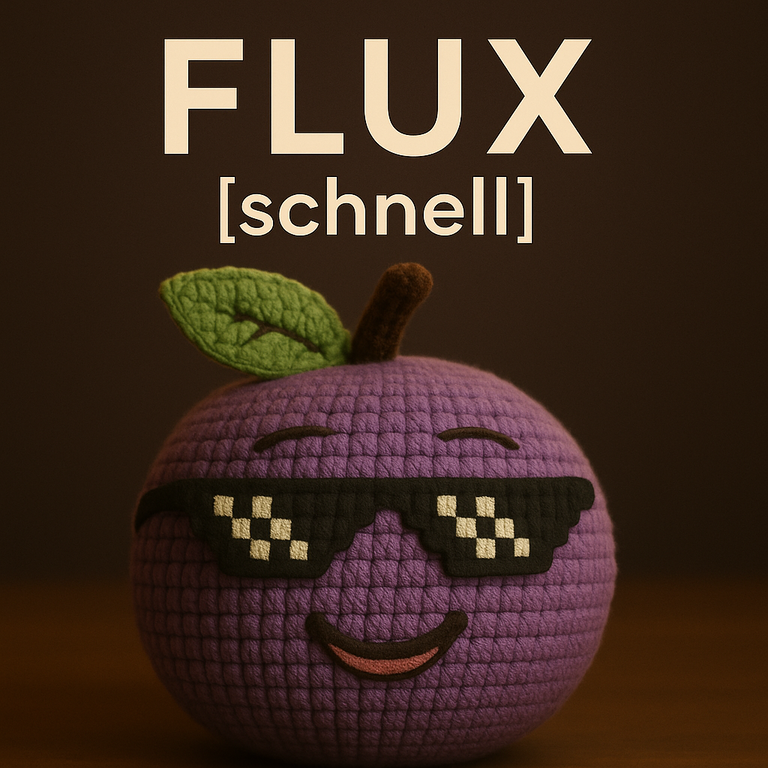
{
  "aspect_ratio": "match_input_image",
  "guidance": 2.5,
  "image_size": 1024,
  "img_cond_path": "https://replicate.delivery/pbxt/NFoiYQ8DdIEQFepICB7SpZB6mI2HC4xZjiHl9mXFqMhZS9sY/flux_schnell.png",
  "num_inference_steps": 30,
  "output_format": "jpg",
  "output_quality": 80,
  "prompt": "Replace “schnell” by “Kontext” and make the prune blue",
  "seed": -1,
  "speed_mode": "Real Time"
}
Install Replicate’s Node.js client library:
npm install replicate
Set the
REPLICATE_API_TOKEN environment variable:export REPLICATE_API_TOKEN=r8_9XZ**********************************
This is your API token. Keep it to yourself.
Import and set up the client:
import Replicate from "replicate";
import fs from "node:fs";

const replicate = new Replicate({
  auth: process.env.REPLICATE_API_TOKEN,
});
Run prunaai/flux-kontext-fast using Replicate’s API. Check out the model's schema for an overview of inputs and outputs.
const output = await replicate.run(
  "prunaai/flux-kontext-fast:2f311ad6069d6cb2ec28d46bb0d1da5148a983b56f4f2643d2d775d39d11e44b",
  {
    input: {
      aspect_ratio: "match_input_image",
      guidance: 2.5,
      image_size: 1024,
      img_cond_path: "https://replicate.delivery/pbxt/NFoiYQ8DdIEQFepICB7SpZB6mI2HC4xZjiHl9mXFqMhZS9sY/flux_schnell.png",
      num_inference_steps: 30,
      output_format: "jpg",
      output_quality: 80,
      prompt: "Replace “schnell” by “Kontext” and make the prune blue",
      seed: -1,
      speed_mode: "Real Time"
    }
  }
);

// To access the file URL:
console.log(output.url()); //=> "http://example.com"

// To write the file to disk:
fs.writeFile("my-image.png", output);
To learn more, take a look at the guide on getting started with Node.js.
Install Replicate’s Python client library:
pip install replicate
Set the
REPLICATE_API_TOKEN environment variable:export REPLICATE_API_TOKEN=r8_9XZ**********************************
This is your API token. Keep it to yourself.
Import the client:
import replicate
Run prunaai/flux-kontext-fast using Replicate’s API. Check out the model's schema for an overview of inputs and outputs.
output = replicate.run(
    "prunaai/flux-kontext-fast:2f311ad6069d6cb2ec28d46bb0d1da5148a983b56f4f2643d2d775d39d11e44b",
    input={
        "aspect_ratio": "match_input_image",
        "guidance": 2.5,
        "image_size": 1024,
        "img_cond_path": "https://replicate.delivery/pbxt/NFoiYQ8DdIEQFepICB7SpZB6mI2HC4xZjiHl9mXFqMhZS9sY/flux_schnell.png",
        "num_inference_steps": 30,
        "output_format": "jpg",
        "output_quality": 80,
        "prompt": "Replace “schnell” by “Kontext” and make the prune blue",
        "seed": -1,
        "speed_mode": "Real Time"
    }
)

# To access the file URL:
print(output.url())
#=> "http://example.com"

# To write the file to disk:
with open("my-image.png", "wb") as file:
    file.write(output.read())
To learn more, take a look at the guide on getting started with Python.
Set the
REPLICATE_API_TOKEN environment variable:export REPLICATE_API_TOKEN=r8_9XZ**********************************
This is your API token. Keep it to yourself.
Run prunaai/flux-kontext-fast using Replicate’s API. Check out the model's schema for an overview of inputs and outputs.
curl -s -X POST \
  -H "Authorization: Bearer $REPLICATE_API_TOKEN" \
  -H "Content-Type: application/json" \
  -H "Prefer: wait" \
  -d $'{
    "version": "prunaai/flux-kontext-fast:2f311ad6069d6cb2ec28d46bb0d1da5148a983b56f4f2643d2d775d39d11e44b",
    "input": {
      "aspect_ratio": "match_input_image",
      "guidance": 2.5,
      "image_size": 1024,
      "img_cond_path": "https://replicate.delivery/pbxt/NFoiYQ8DdIEQFepICB7SpZB6mI2HC4xZjiHl9mXFqMhZS9sY/flux_schnell.png",
      "num_inference_steps": 30,
      "output_format": "jpg",
      "output_quality": 80,
      "prompt": "Replace “schnell” by “Kontext” and make the prune blue",
      "seed": -1,
      "speed_mode": "Real Time"
    }
  }' \
  https://api.replicate.com/v1/predictions
To learn more, take a look at Replicate’s HTTP API reference docs.
Output
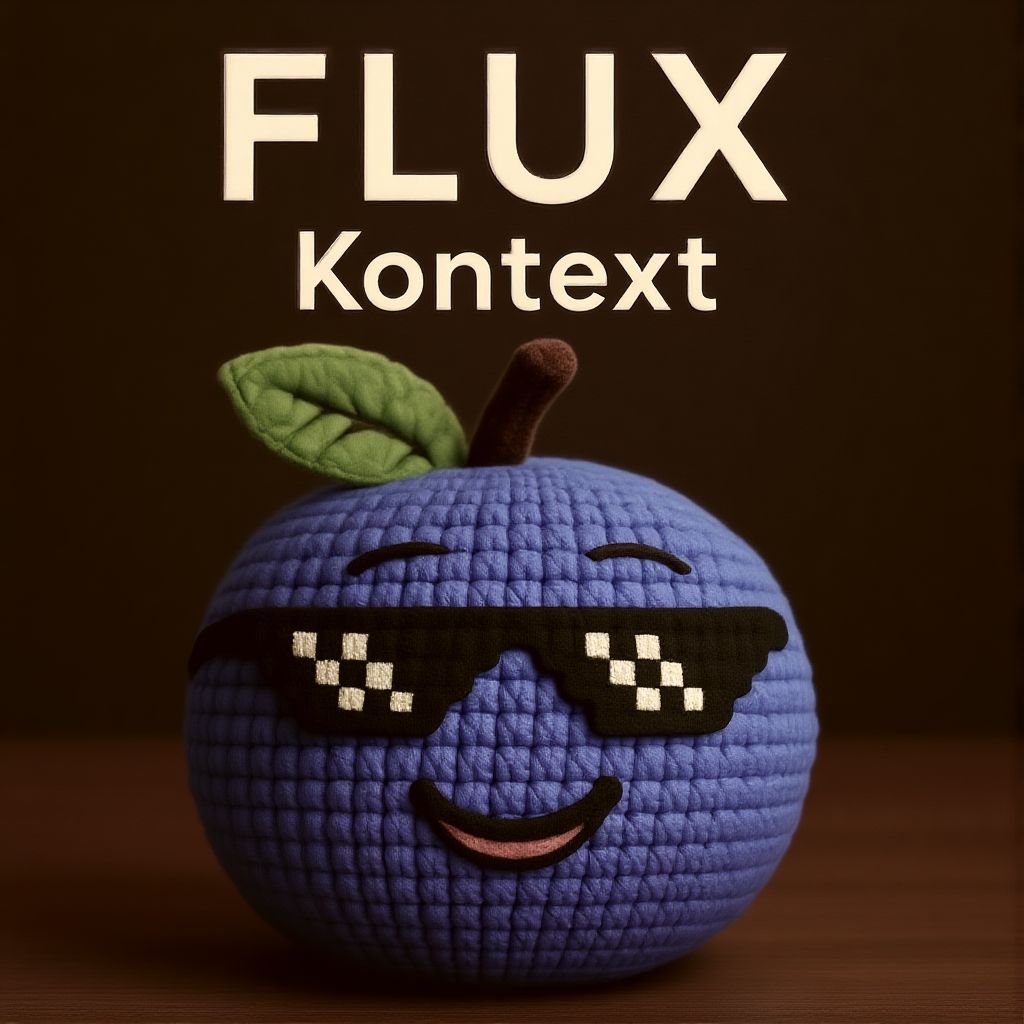
{
  "id": "k9zk8jzqqxrme0cqzzdrfahe64",
  "model": "prunaai/flux-kontext-fast",
  "version": "2f311ad6069d6cb2ec28d46bb0d1da5148a983b56f4f2643d2d775d39d11e44b",
  "input": {
    "aspect_ratio": "match_input_image",
    "guidance": 2.5,
    "image_size": 1024,
    "img_cond_path": "https://replicate.delivery/pbxt/NFoiYQ8DdIEQFepICB7SpZB6mI2HC4xZjiHl9mXFqMhZS9sY/flux_schnell.png",
    "num_inference_steps": 30,
    "output_format": "jpg",
    "output_quality": 80,
    "prompt": "Replace “schnell” by “Kontext” and make the prune blue",
    "seed": -1,
    "speed_mode": "Real Time"
  },
  "logs": "Running prediction with args: ['prompt', 'image', 'height', 'width', 'guidance_scale', 'num_inference_steps', 'generator']\nGeneration `height` and `width` have been adjusted to 1024 and 1024 to fit the model requirements.\n  0%|          | 0/30 [00:00<?, ?it/s]\n 50%|█████     | 15/30 [00:00<00:00, 20.99it/s]\n100%|██████████| 30/30 [00:01<00:00, 24.64it/s]\n100%|██████████| 30/30 [00:01<00:00, 24.01it/s]\nInference took 1.63 seconds",
  "output": "https://replicate.delivery/xezq/Ka4mxeY02FVTZycyOJ60Wf4FxiKwQOkPTuGMmpdvfMhSHLAqA/output_-1_0.jpeg",
  "data_removed": false,
  "error": null,
  "source": "web",
  "status": "succeeded",
  "created_at": "2025-07-12T18:18:15.359Z",
  "started_at": "2025-07-12T18:18:15.415677Z",
  "completed_at": "2025-07-12T18:18:17.15475Z",
  "urls": {
    "cancel": "https://api.replicate.com/v1/predictions/k9zk8jzqqxrme0cqzzdrfahe64/cancel",
    "get": "https://api.replicate.com/v1/predictions/k9zk8jzqqxrme0cqzzdrfahe64",
    "stream": "https://stream.replicate.com/v1/files/bcwr-kv2k4oxyorgkg7g2dxrc2iduq7hrfigwxvzh6y4dh43ptsack7yq",
    "web": "https://replicate.com/p/k9zk8jzqqxrme0cqzzdrfahe64"
  },
  "metrics": {
    "predict_time": 1.739073564,
    "total_time": 1.79575
  }
}
Generated in
Running prediction with args: ['prompt', 'image', 'height', 'width', 'guidance_scale', 'num_inference_steps', 'generator']
Generation `height` and `width` have been adjusted to 1024 and 1024 to fit the model requirements.
0%| | 0/30 [00:00<?, ?it/s]
50%|█████ | 15/30 [00:00<00:00, 20.99it/s]
100%|██████████| 30/30 [00:01<00:00, 24.64it/s]
100%|██████████| 30/30 [00:01<00:00, 24.01it/s]
Inference took 1.63 seconds