typetext
Official model
ID
z3jpsevkdhrm80cv56maz0tehw
Status
Succeeded
Source
Web
Total duration
Created
by openai
Webhook
–
Input
- prompt
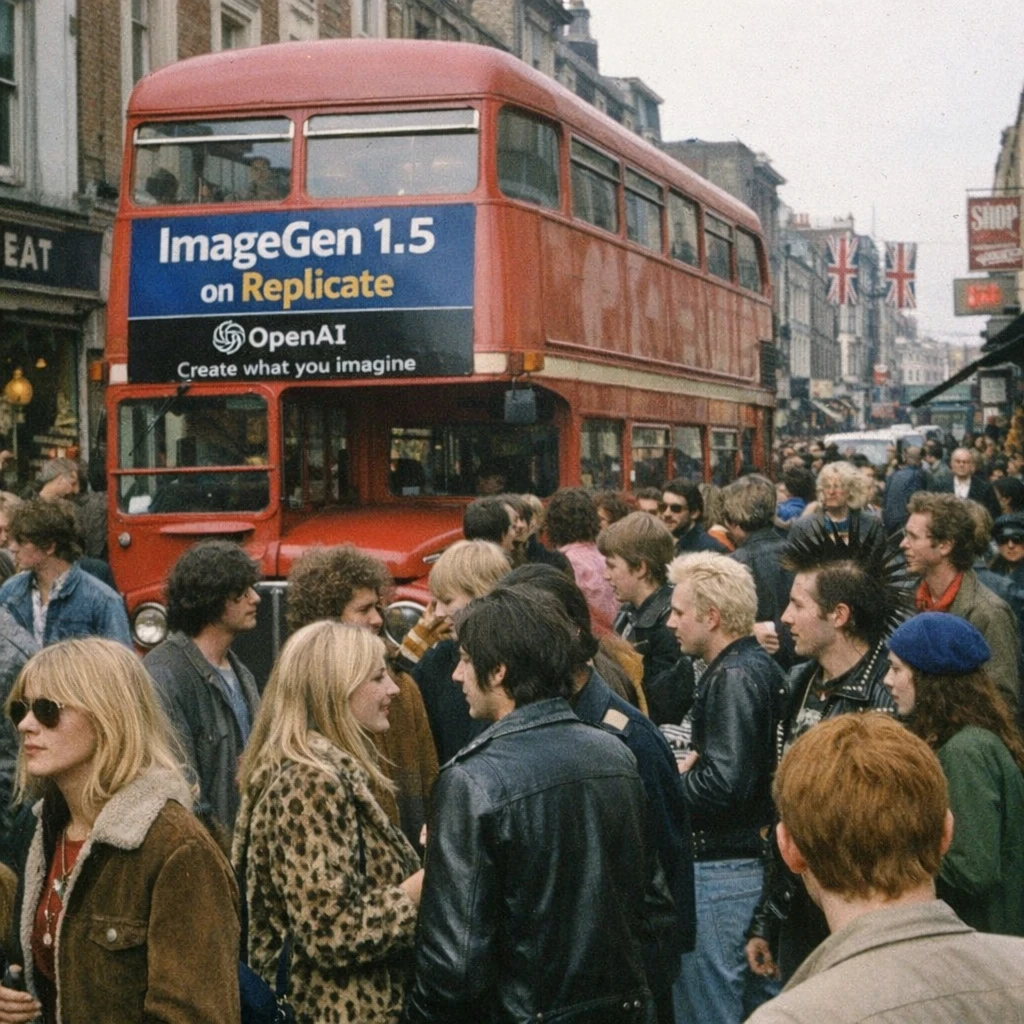
- make a scene in chelsea, london in the 1970s, photorealistic, everything in focus, with tons of people, and a bus with an advertisement for "ImageGen 1.5 on Replicate" with the OpenAI logo and subtitle "Create what you imagine". Hyper-realistic amateur photography, iPhone snapshot quality
- aspect_ratio
- 1:1default1:1typeenumvalue typestringoptions1:1, 3:2, 2:3
- input_fidelity
- lowdefaultlowtypeenumvalue typestringoptionslow, high
- number_of_images
- 1default1typenumeric-rangevalue typeintegerminimum1maximum10
- quality
- highdefaultautotypeenumvalue typestringoptionslow, medium, high, auto
- background
- autodefaultautotypeenumvalue typestringoptionsauto, transparent, opaque
- output_compression
- 90default90typenumeric-rangevalue typeintegermaximum100
- output_format
- webpdefaultwebptypeenumvalue typestringoptionspng, jpeg, webp
- moderation
- autodefaultautotypeenumvalue typestringoptionsauto, low
{
  "aspect_ratio": "1:1",
  "background": "auto",
  "input_fidelity": "low",
  "moderation": "auto",
  "number_of_images": 1,
  "output_compression": 90,
  "output_format": "webp",
  "prompt": "make a scene in chelsea, london in the 1970s, photorealistic, everything in focus, with tons of people, and a bus with an advertisement for \"ImageGen 1.5 on Replicate\" with the OpenAI logo and subtitle \"Create what you imagine\". Hyper-realistic amateur photography, iPhone snapshot quality",
  "quality": "high"
}
Install Replicate’s Node.js client library:
npm install replicate
Set the
REPLICATE_API_TOKEN environment variable:export REPLICATE_API_TOKEN=r8_ebW**********************************
This is your API token. Keep it to yourself.
Import and set up the client:
import Replicate from "replicate";
import fs from "node:fs";

const replicate = new Replicate({
  auth: process.env.REPLICATE_API_TOKEN,
});
Run openai/gpt-image-1.5 using Replicate’s API. Check out the model's schema for an overview of inputs and outputs.
const input = {
  aspect_ratio: "1:1",
  background: "auto",
  input_fidelity: "low",
  moderation: "auto",
  number_of_images: 1,
  output_compression: 90,
  output_format: "webp",
  prompt: "make a scene in chelsea, london in the 1970s, photorealistic, everything in focus, with tons of people, and a bus with an advertisement for \"ImageGen 1.5 on Replicate\" with the OpenAI logo and subtitle \"Create what you imagine\". Hyper-realistic amateur photography, iPhone snapshot quality",
  quality: "high"
};

const output = await replicate.run("openai/gpt-image-1.5", { input });

// To access the file URL:
console.log(output[0].url()); //=> "http://example.com"

// To write the file to disk:
fs.writeFile("my-image.png", output[0]);
To learn more, take a look at the guide on getting started with Node.js.
Install Replicate’s Python client library:
pip install replicate
Set the
REPLICATE_API_TOKEN environment variable:export REPLICATE_API_TOKEN=r8_ebW**********************************
This is your API token. Keep it to yourself.
Import the client:
import replicate
Run openai/gpt-image-1.5 using Replicate’s API. Check out the model's schema for an overview of inputs and outputs.
output = replicate.run(
    "openai/gpt-image-1.5",
    input={
        "aspect_ratio": "1:1",
        "background": "auto",
        "input_fidelity": "low",
        "moderation": "auto",
        "number_of_images": 1,
        "output_compression": 90,
        "output_format": "webp",
        "prompt": "make a scene in chelsea, london in the 1970s, photorealistic, everything in focus, with tons of people, and a bus with an advertisement for \"ImageGen 1.5 on Replicate\" with the OpenAI logo and subtitle \"Create what you imagine\". Hyper-realistic amateur photography, iPhone snapshot quality",
        "quality": "high"
    }
)

# To access the file URL:
print(output[0].url())
#=> "http://example.com"

# To write the file to disk:
with open("my-image.png", "wb") as file:
    file.write(output[0].read())
To learn more, take a look at the guide on getting started with Python.
Set the
REPLICATE_API_TOKEN environment variable:export REPLICATE_API_TOKEN=r8_ebW**********************************
This is your API token. Keep it to yourself.
Run openai/gpt-image-1.5 using Replicate’s API. Check out the model's schema for an overview of inputs and outputs.
curl -s -X POST \
  -H "Authorization: Bearer $REPLICATE_API_TOKEN" \
  -H "Content-Type: application/json" \
  -H "Prefer: wait" \
  -d $'{
    "input": {
      "aspect_ratio": "1:1",
      "background": "auto",
      "input_fidelity": "low",
      "moderation": "auto",
      "number_of_images": 1,
      "output_compression": 90,
      "output_format": "webp",
      "prompt": "make a scene in chelsea, london in the 1970s, photorealistic, everything in focus, with tons of people, and a bus with an advertisement for \\"ImageGen 1.5 on Replicate\\" with the OpenAI logo and subtitle \\"Create what you imagine\\". Hyper-realistic amateur photography, iPhone snapshot quality",
      "quality": "high"
    }
  }' \
  https://api.replicate.com/v1/models/openai/gpt-image-1.5/predictions
To learn more, take a look at Replicate’s HTTP API reference docs.
Output
{
  "id": "z3jpsevkdhrm80cv56maz0tehw",
  "model": "openai/gpt-image-1.5",
  "version": "hidden",
  "input": {
    "aspect_ratio": "1:1",
    "background": "auto",
    "input_fidelity": "low",
    "moderation": "auto",
    "number_of_images": 1,
    "output_compression": 90,
    "output_format": "webp",
    "prompt": "make a scene in chelsea, london in the 1970s, photorealistic, everything in focus, with tons of people, and a bus with an advertisement for \"ImageGen 1.5 on Replicate\" with the OpenAI logo and subtitle \"Create what you imagine\". Hyper-realistic amateur photography, iPhone snapshot quality",
    "quality": "high"
  },
  "logs": "Model: gpt-image-1.5\nGenerating image...\nGenerated image in 47.5sec\nGenerated 1 images\nInput text token count: 77\nInput image token count: 0\nOutput token count: 4666",
  "output": [
    "https://replicate.delivery/xezq/cfGqZx844oRYLKNR6CWBVNARYlJVBfmgeOKbGP0z1vzeAqPXB/tmp9zf8qbu4.webp"
  ],
  "data_removed": false,
  "error": null,
  "source": "web",
  "status": "succeeded",
  "created_at": "2025-12-17T00:14:24.108Z",
  "started_at": "2025-12-17T00:14:24.150126Z",
  "completed_at": "2025-12-17T00:15:11.697051Z",
  "urls": {
    "cancel": "https://api.replicate.com/v1/predictions/z3jpsevkdhrm80cv56maz0tehw/cancel",
    "get": "https://api.replicate.com/v1/predictions/z3jpsevkdhrm80cv56maz0tehw",
    "stream": "https://stream.replicate.com/v1/files/bcwr-34qjpiwolwu6rgwmbwt67w2kaycghyknldnznv2iiisp3l3vm2kq",
    "web": "https://replicate.com/p/z3jpsevkdhrm80cv56maz0tehw"
  },
  "metrics": {
    "predict_time": 47.546925026,
    "total_time": 47.589051305
  }
}
Generated in
Model: gpt-image-1.5
Generating image...
Generated image in 47.5sec
Generated 1 images
Input text token count: 77
Input image token count: 0
Output token count: 4666