typetext
ID
2ygygulbup6s4ynexsp2n5c3ua
Status
Succeeded
Source
Web
Hardware
A40
Total duration
Created
by zylim0702
Webhook
–
Input
- Lora_url
- https://replicate.delivery/pbxt/aEt6InPOlTpZJZ9Y1664pLuWBf5ZdIKdjDK4FmHVB2EA47tIA/trained_model.tar
- prompt
- a photo of TOK , white background, pink blazer, american hairstyledefaultAn TOK riding a rainbow unicorntypetext
- width
- 1024default1024typenumericvalue typeinteger
- height
- 1024default1024typenumericvalue typeinteger
- num_outputs
- 4default1typenumeric-rangevalue typeintegerminimum1maximum4
- scheduler
- K_EULERdefaultK_EULERtypeenumvalue typestringoptionsDDIM, DPMSolverMultistep, HeunDiscrete, KarrasDPM, K_EULER_ANCESTRAL, K_EULER, PNDM
- num_inference_steps
- 20default50typenumeric-rangevalue typeintegerminimum1maximum500
- guidance_scale
- 7.5default7.5typenumeric-rangevalue typenumberminimum1maximum50
- prompt_strength
- 0.8default0.8typenumeric-rangevalue typenumbermaximum1
- refine
- no_refinerdefaultno_refinertypeenumvalue typestringoptionsno_refiner, expert_ensemble_refiner, base_image_refiner
- high_noise_frac
- 0.8default0.8typenumeric-rangevalue typenumbermaximum1
- apply_watermark
- truedefaulttruetypeboolean
- lora_scale
- 0.6default0.6typenumeric-rangevalue typenumbermaximum1
{
  "Lora_url": "https://replicate.delivery/pbxt/aEt6InPOlTpZJZ9Y1664pLuWBf5ZdIKdjDK4FmHVB2EA47tIA/trained_model.tar",
  "apply_watermark": true,
  "guidance_scale": 7.5,
  "height": 1024,
  "high_noise_frac": 0.8,
  "lora_scale": 0.6,
  "num_inference_steps": 20,
  "num_outputs": 4,
  "prompt": "a photo of TOK , white background, pink blazer, american hairstyle",
  "prompt_strength": 0.8,
  "refine": "no_refiner",
  "scheduler": "K_EULER",
  "width": 1024
}
Install Replicate’s Node.js client library:
npm install replicate
Set the
REPLICATE_API_TOKEN environment variable:export REPLICATE_API_TOKEN=r8_20N**********************************
This is your API token. Keep it to yourself.
Import and set up the client:
import Replicate from "replicate";
import fs from "node:fs";

const replicate = new Replicate({
  auth: process.env.REPLICATE_API_TOKEN,
});
Run zylim0702/sdxl-lora-customize-model using Replicate’s API. Check out the model's schema for an overview of inputs and outputs.
const output = await replicate.run(
  "zylim0702/sdxl-lora-customize-model:5a2b1cff79a2cf60d2a498b424795a90e26b7a3992fbd13b340f73ff4942b81e",
  {
    input: {
      Lora_url: "https://replicate.delivery/pbxt/aEt6InPOlTpZJZ9Y1664pLuWBf5ZdIKdjDK4FmHVB2EA47tIA/trained_model.tar",
      apply_watermark: true,
      guidance_scale: 7.5,
      height: 1024,
      high_noise_frac: 0.8,
      lora_scale: 0.6,
      num_inference_steps: 20,
      num_outputs: 4,
      prompt: "a photo of TOK , white background, pink blazer, american hairstyle",
      prompt_strength: 0.8,
      refine: "no_refiner",
      scheduler: "K_EULER",
      width: 1024
    }
  }
);

// To access the file URL:
console.log(output[0].url()); //=> "http://example.com"

// To write the file to disk:
fs.writeFile("my-image.png", output[0]);
To learn more, take a look at the guide on getting started with Node.js.
Install Replicate’s Python client library:
pip install replicate
Set the
REPLICATE_API_TOKEN environment variable:export REPLICATE_API_TOKEN=r8_20N**********************************
This is your API token. Keep it to yourself.
Import the client:
import replicate
Run zylim0702/sdxl-lora-customize-model using Replicate’s API. Check out the model's schema for an overview of inputs and outputs.
output = replicate.run(
    "zylim0702/sdxl-lora-customize-model:5a2b1cff79a2cf60d2a498b424795a90e26b7a3992fbd13b340f73ff4942b81e",
    input={
        "Lora_url": "https://replicate.delivery/pbxt/aEt6InPOlTpZJZ9Y1664pLuWBf5ZdIKdjDK4FmHVB2EA47tIA/trained_model.tar",
        "apply_watermark": True,
        "guidance_scale": 7.5,
        "height": 1024,
        "high_noise_frac": 0.8,
        "lora_scale": 0.6,
        "num_inference_steps": 20,
        "num_outputs": 4,
        "prompt": "a photo of TOK , white background, pink blazer, american hairstyle",
        "prompt_strength": 0.8,
        "refine": "no_refiner",
        "scheduler": "K_EULER",
        "width": 1024
    }
)

# To access the file URL:
print(output[0].url())
#=> "http://example.com"

# To write the file to disk:
with open("my-image.png", "wb") as file:
    file.write(output[0].read())
To learn more, take a look at the guide on getting started with Python.
Set the
REPLICATE_API_TOKEN environment variable:export REPLICATE_API_TOKEN=r8_20N**********************************
This is your API token. Keep it to yourself.
Run zylim0702/sdxl-lora-customize-model using Replicate’s API. Check out the model's schema for an overview of inputs and outputs.
curl -s -X POST \
  -H "Authorization: Bearer $REPLICATE_API_TOKEN" \
  -H "Content-Type: application/json" \
  -H "Prefer: wait" \
  -d $'{
    "version": "zylim0702/sdxl-lora-customize-model:5a2b1cff79a2cf60d2a498b424795a90e26b7a3992fbd13b340f73ff4942b81e",
    "input": {
      "Lora_url": "https://replicate.delivery/pbxt/aEt6InPOlTpZJZ9Y1664pLuWBf5ZdIKdjDK4FmHVB2EA47tIA/trained_model.tar",
      "apply_watermark": true,
      "guidance_scale": 7.5,
      "height": 1024,
      "high_noise_frac": 0.8,
      "lora_scale": 0.6,
      "num_inference_steps": 20,
      "num_outputs": 4,
      "prompt": "a photo of TOK , white background, pink blazer, american hairstyle",
      "prompt_strength": 0.8,
      "refine": "no_refiner",
      "scheduler": "K_EULER",
      "width": 1024
    }
  }' \
  https://api.replicate.com/v1/predictions
To learn more, take a look at Replicate’s HTTP API reference docs.
Output
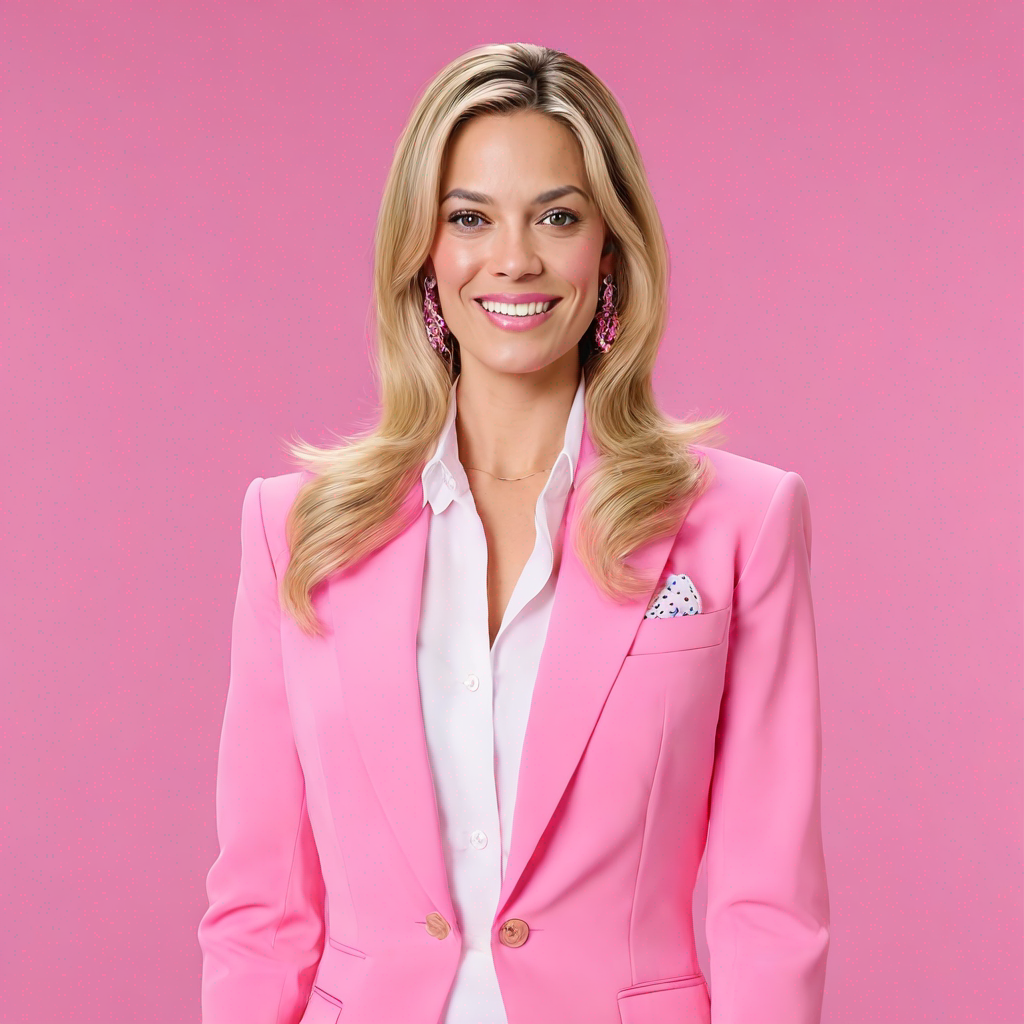


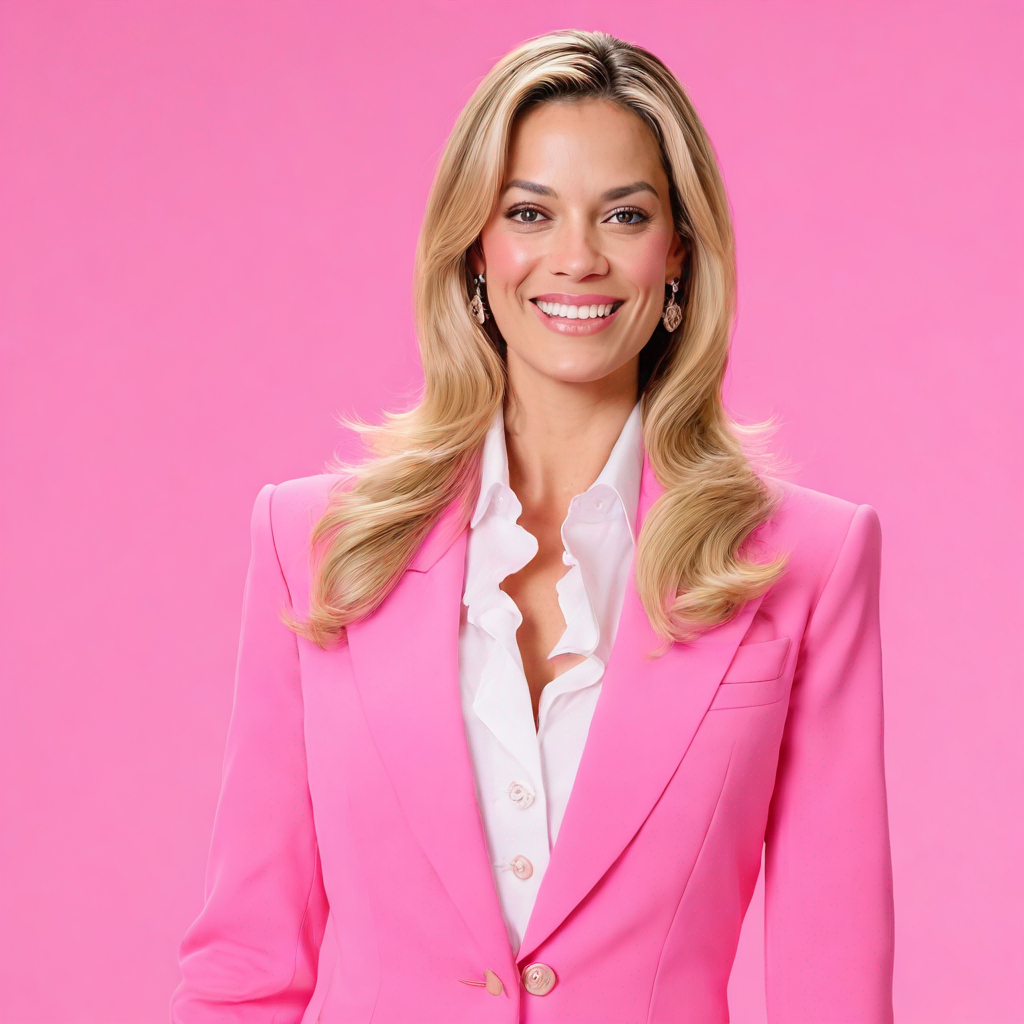
{
  "id": "2ygygulbup6s4ynexsp2n5c3ua",
  "model": "zylim0702/sdxl-lora-customize-model",
  "version": "5a2b1cff79a2cf60d2a498b424795a90e26b7a3992fbd13b340f73ff4942b81e",
  "input": {
    "Lora_url": "https://replicate.delivery/pbxt/aEt6InPOlTpZJZ9Y1664pLuWBf5ZdIKdjDK4FmHVB2EA47tIA/trained_model.tar",
    "apply_watermark": true,
    "guidance_scale": 7.5,
    "height": 1024,
    "high_noise_frac": 0.8,
    "lora_scale": 0.6,
    "num_inference_steps": 20,
    "num_outputs": 4,
    "prompt": "a photo of TOK , white background, pink blazer, american hairstyle",
    "prompt_strength": 0.8,
    "refine": "no_refiner",
    "scheduler": "K_EULER",
    "width": 1024
  },
  "logs": "Loading sdxl txt2img pipeline...\nLoading pipeline components...:   0%|          | 0/7 [00:00<?, ?it/s]\nLoading pipeline components...:  14%|█▍        | 1/7 [00:00<00:02,  2.77it/s]\nLoading pipeline components...:  29%|██▊       | 2/7 [00:01<00:03,  1.48it/s]\nLoading pipeline components...:  43%|████▎     | 3/7 [00:01<00:02,  1.90it/s]\nLoading pipeline components...: 100%|██████████| 7/7 [00:01<00:00,  5.68it/s]\nLoading pipeline components...: 100%|██████████| 7/7 [00:01<00:00,  3.95it/s]\nLoading fine-tuned model\nDoes not have Unet. Assume we are using LoRA\nLoading Unet LoRA\nLoading SDXL img2img pipeline...\nLoading SDXL inpaint pipeline...\nLoading SDXL refiner pipeline...\nLoading refiner pipeline...\nLoading pipeline components...:   0%|          | 0/4 [00:00<?, ?it/s]\nLoading pipeline components...:  25%|██▌       | 1/4 [00:00<00:01,  1.52it/s]\nLoading pipeline components...: 100%|██████████| 4/4 [00:00<00:00,  5.71it/s]\nUsing seed: 8931\nPrompt: a photo of <s0><s1> , white background, pink blazer, american hairstyle\ntxt2img mode\n  0%|          | 0/20 [00:00<?, ?it/s]\n  5%|▌         | 1/20 [00:00<00:18,  1.00it/s]\n 10%|█         | 2/20 [00:01<00:17,  1.00it/s]\n 15%|█▌        | 3/20 [00:02<00:16,  1.00it/s]\n 20%|██        | 4/20 [00:03<00:15,  1.00it/s]\n 25%|██▌       | 5/20 [00:04<00:14,  1.00it/s]\n 30%|███       | 6/20 [00:05<00:13,  1.00it/s]\n 35%|███▌      | 7/20 [00:06<00:12,  1.00it/s]\n 40%|████      | 8/20 [00:07<00:12,  1.00s/it]\n 45%|████▌     | 9/20 [00:08<00:11,  1.00s/it]\n 50%|█████     | 10/20 [00:09<00:09,  1.00it/s]\n 55%|█████▌    | 11/20 [00:10<00:08,  1.00it/s]\n 60%|██████    | 12/20 [00:11<00:07,  1.00it/s]\n 65%|██████▌   | 13/20 [00:12<00:06,  1.00it/s]\n 70%|███████   | 14/20 [00:13<00:05,  1.00it/s]\n 75%|███████▌  | 15/20 [00:14<00:04,  1.00it/s]\n 80%|████████  | 16/20 [00:15<00:03,  1.00it/s]\n 85%|████████▌ | 17/20 [00:16<00:02,  1.00it/s]\n 90%|█████████ | 18/20 [00:17<00:01,  1.00it/s]\n 95%|█████████▌| 19/20 [00:18<00:01,  1.00s/it]\n100%|██████████| 20/20 [00:19<00:00,  1.00s/it]\n100%|██████████| 20/20 [00:19<00:00,  1.00it/s]",
  "output": [
    "https://replicate.delivery/pbxt/Zk65CFgBb5IFJVh3wHmocSMGbgZ1jLIvTeeo8b31B3ph03bRA/out-0.png",
    "https://replicate.delivery/pbxt/cHq7PLwgkWb8LlFYXOepVna3PY5dfhbeJQQcMxXfdfrXke9WE/out-1.png",
    "https://replicate.delivery/pbxt/1qSkUORcadLnEJDxNPtLXdnCMBkEp9jmDxKyGIR9mOuI99WE/out-2.png",
    "https://replicate.delivery/pbxt/nSoKenfp8aqFTkQ4qcDeifAOKbPXeRarzT6fj3I1cm6zI99WE/out-3.png"
  ],
  "data_removed": false,
  "error": null,
  "source": "web",
  "status": "succeeded",
  "created_at": "2023-08-20T08:12:47.927861Z",
  "started_at": "2023-08-20T08:12:47.935968Z",
  "completed_at": "2023-08-20T08:13:23.776805Z",
  "urls": {
    "cancel": "https://api.replicate.com/v1/predictions/2ygygulbup6s4ynexsp2n5c3ua/cancel",
    "get": "https://api.replicate.com/v1/predictions/2ygygulbup6s4ynexsp2n5c3ua"
  },
  "metrics": {
    "predict_time": 35.840837,
    "total_time": 35.848944
  }
}
Generated in
Loading sdxl txt2img pipeline...
Loading pipeline components...: 0%| | 0/7 [00:00<?, ?it/s]
Loading pipeline components...: 14%|█▍ | 1/7 [00:00<00:02, 2.77it/s]
Loading pipeline components...: 29%|██▊ | 2/7 [00:01<00:03, 1.48it/s]
Loading pipeline components...: 43%|████▎ | 3/7 [00:01<00:02, 1.90it/s]
Loading pipeline components...: 100%|██████████| 7/7 [00:01<00:00, 5.68it/s]
Loading pipeline components...: 100%|██████████| 7/7 [00:01<00:00, 3.95it/s]
Loading fine-tuned model
Does not have Unet. Assume we are using LoRA
Loading Unet LoRA
Loading SDXL img2img pipeline...
Loading SDXL inpaint pipeline...
Loading SDXL refiner pipeline...
Loading refiner pipeline...
Loading pipeline components...: 0%| | 0/4 [00:00<?, ?it/s]
Loading pipeline components...: 25%|██▌ | 1/4 [00:00<00:01, 1.52it/s]
Loading pipeline components...: 100%|██████████| 4/4 [00:00<00:00, 5.71it/s]
Using seed: 8931
Prompt: a photo of <s0><s1> , white background, pink blazer, american hairstyle
txt2img mode
0%| | 0/20 [00:00<?, ?it/s]
5%|▌ | 1/20 [00:00<00:18, 1.00it/s]
10%|█ | 2/20 [00:01<00:17, 1.00it/s]
15%|█▌ | 3/20 [00:02<00:16, 1.00it/s]
20%|██ | 4/20 [00:03<00:15, 1.00it/s]
25%|██▌ | 5/20 [00:04<00:14, 1.00it/s]
30%|███ | 6/20 [00:05<00:13, 1.00it/s]
35%|███▌ | 7/20 [00:06<00:12, 1.00it/s]
40%|████ | 8/20 [00:07<00:12, 1.00s/it]
45%|████▌ | 9/20 [00:08<00:11, 1.00s/it]
50%|█████ | 10/20 [00:09<00:09, 1.00it/s]
55%|█████▌ | 11/20 [00:10<00:08, 1.00it/s]
60%|██████ | 12/20 [00:11<00:07, 1.00it/s]
65%|██████▌ | 13/20 [00:12<00:06, 1.00it/s]
70%|███████ | 14/20 [00:13<00:05, 1.00it/s]
75%|███████▌ | 15/20 [00:14<00:04, 1.00it/s]
80%|████████ | 16/20 [00:15<00:03, 1.00it/s]
85%|████████▌ | 17/20 [00:16<00:02, 1.00it/s]
90%|█████████ | 18/20 [00:17<00:01, 1.00it/s]
95%|█████████▌| 19/20 [00:18<00:01, 1.00s/it]
100%|██████████| 20/20 [00:19<00:00, 1.00s/it]
100%|██████████| 20/20 [00:19<00:00, 1.00it/s]